


If we want to set up an online business, or have a place for our customers to communicate in virtual space, a website can definitely be a very good idea. Building a website from zero to one hundred may seem like a time-consuming and complicated process. In this article, we will teach you step by step how to build a website.
تماس فوری
Determining the goal and needs
To begin, you need to define the purpose and needs of your website. This includes the type and content of the website, business purpose, user needs and other factors.
Determining facilities
Before designing the site, research what facilities will meet your goals and needs as well as the goals and needs of your customers and site visitors.
🔴 domain purchase 🔴
Buying a domain for website design means buying a name or address that will be assigned to your website. The domain can include your brand name, company name or any other desired name that is related to the content of your website. To buy a domain, you need to visit a domain registrar (usually a domain service company) and search for the domain name you want. If the domain you want is available, you can buy it. Otherwise, you have to choose another domain name or suggest to the owner of your desired domain to buy the domain.
The cost of buying a domain may vary depending on the type of domain, the extension, the duration of the purchase (usually yearly) and the domain registrar company. Domain extensions like .com, .net, .org and .ir can be available at different rates and prices.
After buying a domain, you can use it to build your website. To do this, you need to connect the domain to a web host and place your website on the host's servers.
It is shopping
Buying hosting for website design means buying storage space and server resources to host and maintain your website. Web hosting is a space on Internet servers that allows you to store files, databases, images and other components of your site on the Internet and provide public access to them. To buy hosting for website design, you need to choose a reliable hosting company. Some factors to consider are:
Bandwidth: Bandwidth is related to the amount of traffic that your site can have per month. Based on the number of visitors and the volume of site content, you should choose the appropriate bandwidth. Technical support: Make sure that the hosting company you choose offers 24/7 technical support and will help you in case of server or technical problems. Security: The security of the server and hosting services is very important. Make sure the hosting company takes measures such as encryption, SSL support, and server protection.
Ability to install and use content management systems: Some hosting companies provide easy installation of content management systems such as WordPress, Joomla, and Drupal, which allow you to complete your site easily. After choosing a hosting company, you usually need to choose the hosting plan you want and then start the purchase process. In this process, you may pay in advance for a certain period of time. After placing the order, you will receive the necessary information to access your hosting, such as IP address, username and password.
By receiving the hosting information, you can upload files and resources of your site on the server and design and develop your site. After designing the site, you can connect the domain you bought with the host so that your site can be accessed and viewed on the Internet.
تماس فوری
Choosing a platform or content management system
Choosing a platform or content management system (Content Management System or CMS) for website design depends on your specific needs and requirements. Each platform or content management system has its own features, capabilities, and limitations, so you should carefully examine your needs and choose accordingly. Some popular platforms and content management systems include:
Drupal (Drupal): Drupal is also one of the popular content management systems that provides many features and capabilities for customizing and developing websites. This platform is mostly used for complex sites and many features.
WooCommerce: If you are building an online store, WooCommerce may be a good option. This plugin is for WordPress and provides shop and payment features.
Magento: If you need a large online store and complex features, Magento may be the right choice. This platform is suitable for large and complex stores and provides many features.
🔴ssL certificate 🔴
SSL certificate (Secure Sockets Layer) or TLS (Transport Layer Security) is a security protocol that is used to establish secure communication between users and websites. This security certificate is used to encrypt information that is sent and received between the browser and the server.
When a user opens a website, the web browser establishes a connection with the server and sends a request to receive the required pages and resources. In this process, an SSL certificate is used between the browser and the server to encrypt the communication. This encryption causes the information sent between the browser and the server to be encrypted and safely prevent access by unauthorized people in this process.
SSL certificate contains information that is issued by an integrity measuring company (Certificate Authority). This certificate contains information such as the domain name of the site, the name of the site owner, the validity period of the certificate and encryption information. When the web browser connects to the server, the SSL certificate is checked and if it is valid and valid, a secure connection is established and an indicator like a lock is displayed in the address bar of the browser to inform users of the security of the connection.
This certificate helps web designers and site administrators to establish a secure connection between users and their site and prevent attacks such as stealing users' personal information and passwords. Also, an SSL certificate helps sites improve their search engine rankings because search engines prefer sites that use a secure SSL connection to improve security and protect users.
🔴 site construction stage 🔴
Any type of site can be built in several different ways; But in this article, we are going to design a site with WordPress together. Building a website using WordPress can be divided into three main steps: installing and setting up WordPress, choosing a WordPress template and customizing the website.
🔻🔺Installing and adjusting WordPress:
🔻The first step is installing WordPress. You can download the latest version of WordPress from the official WordPress site (wordpress.org) and install it on your server. If you have done your web hosting through a web server, many web hosting services have the option of installing WordPress automatically.
🔻🔺Choosing a WordPress template:
🔻Wordpress offers many templates that you can use to design your website. Among the available free and paid templates, you can choose a template that meets your needs and tastes.
Also, you can use WordPress plugins to add additional features to your website, including form building, SEO optimization, sharing on social networks, etc.
These three steps are only the main steps, and depending on the needs and complexity of the project, there may be other steps.
تماس فوری
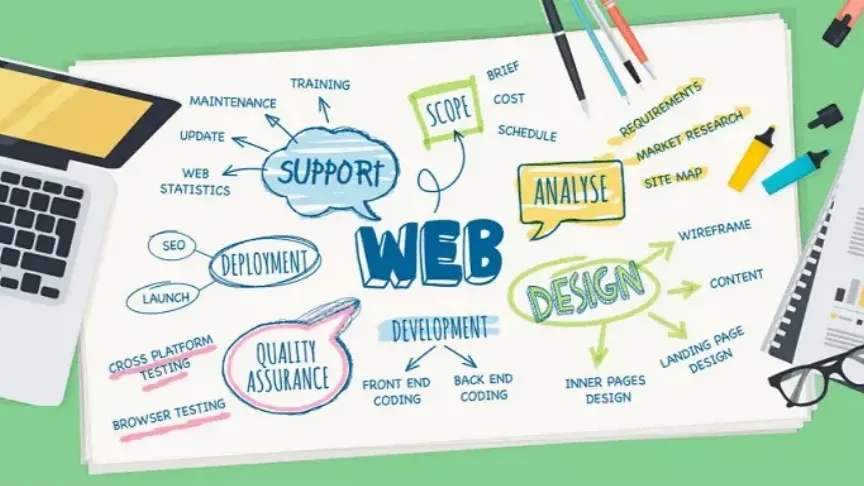
Website content and management
After we have designed our site and the primary audience has visited our site, it is time to check and analyze the statistics of visits and the way and quality of the content of our site.
For this, one of the best and most useful tools is Google Analytics. To use this wonderful tool, after registering on the Google Analytics site, we will be given a code that we must place on our site, so that Google can track or leave the actions of users on our site.
To place the analytics code on the site, we can use plugins such as insert header and footer, which after installing the plugin, we just need to paste the code in it.
But we can also enter it manually, because it is better to keep our site as light as possible. The meaning of "lighter" is that if we use one plugin for everything and the number of plugins increases, our site will become heavy and in addition to slowing down, the codes of these plugins may interfere with each other and we may encounter problems.
Regarding the content, if we want to make the articles and pages that we have produced visible to everyone or to be seen on the first pages of Google, we must SEO that page.